 .
.The mixed stage compatible pumps table captures other
compatible pump hydraulics which can be mixed with the primary pump's
hydraulics. The primary purpose of this functionality is to enable low
NPSH characteristics by defining special alternate first stage hydraulics,
and to "shape" the head curve to better meet multiple duty points
through "mixing" the upper stages. See below to learn how to
populate the SKB for the Selector to take advantage of this capability.
To see an example of how the Selector presents this information, click
this image .
In the General Product Line Table, there two columns regarding stage mixing. They are “Mixed stage data type” and “Mixed stage suffix position”.
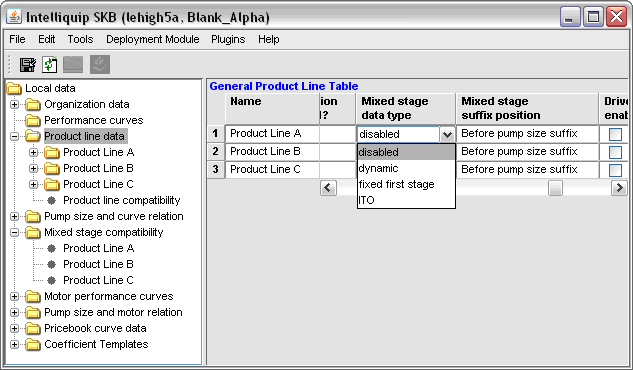
Mixed stage settings for product lines
Select a Mixed stage data type:
Disabled: No mixed stages
Dynamic: First stage dynamic and fixed first stage mixing supported. For more information see Step 9
Fixed first stage: Only fixed first stage supported (Max. dia.). For more information see Step 9
ITO: Inter-stage take-off only supported
In addition to mixed stages, some product line options can also add suffixes to pump sizes. Use the “Mixed stage suffix position” option to specify whether the stage mixing suffix will come before or after any other suffixes. More info on stage mixing suffixes can be found below.
In the navigation tree, open the “Mixed stage compatibility” folder, and select the product line for which the table is to be populated.
The data manager window will display the Mixed Stage - Compatible Pumps Table for the product line.
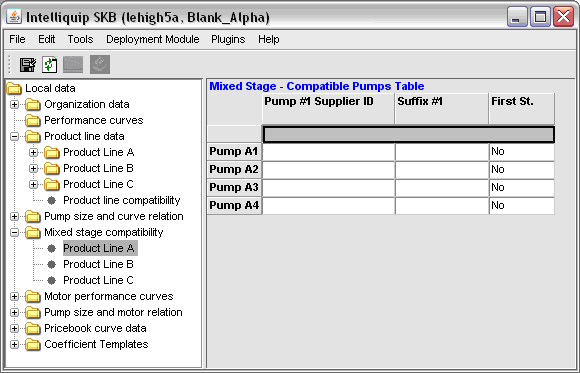
The above image shows that Product Line A has been selected for mixed stage compatible implementation.
The headers for the table rows will automatically populate the pump sizes for the product line selected and display the columns necessary to define the first compatible pump set.
The next step is to identify the product line from which the mixed stage performance pump hydraulics are to be taken. This is accomplished by selecting the product line from the drop down menu, which is displayed by clicking in the empty cell directly under the Pump #1 Supplier ID header.
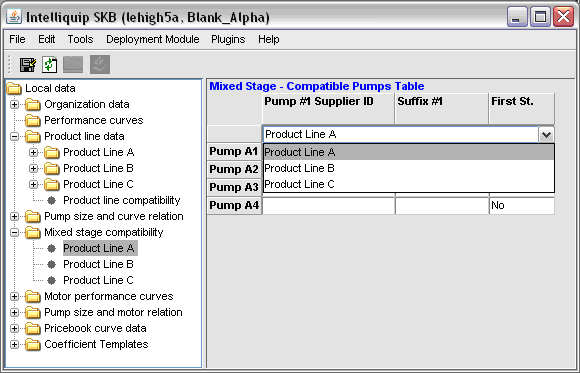
This image shows that Product Line A is being selected from the drop down menu.
Once the product line is selected, the below mixed stage information for each applicable pump size needs to be entered:
Choices for first stage behavior:
The mixed stage pump will be available to be selected for sets #2, #3 and #4.
The mixed stage pump will not be available as an “Alternate first stage”.
Search results will not include the combined primary and mixed stage
The mixed stage pump will not be available to be selected for sets #2, #3 and #4.
The mixed stage pump be available as an “Alternate first stage” and by default will use its maximum impeller diameter.
Search results will include:
The primary pump on it’s own
The combined primary and mixed stage pump
The mixed stage pump will not be available to be selected for sets #2, #3 and #4.
The mixed stage pump will be available as an “Alternate first stage”, and by default will attempt to set the impeller diameter to the same diameter as the primary pump. If the selected diameter of the primary pump is greater than the maximum diameter of the mixed stage pump, then the mixed stage will be set to it’s maximum. If the selected diameter of the primary pump is smaller than the minimum diameter of the mixed stage pump, then the mixed stage will be set to its minimum.
Search results will include:
The primary pump on it’s own
The combined primary and mixed stage pump
The mixed stage pump will not be available to be selected for sets #2, #3 and #4.
The mixed stage pump be fixed as an “Alternate first stage”, and by default will use its maximum impeller diameter.
Search results will include:
The combined primary and mixed stage pump
The mixed stage pump will not be available to be selected for sets #2, #3 and #4.
The mixed stage pump be fixed as an “Alternate first stage”, and by default it will attempt to set the impeller diameter to the same diameter as the primary pump. If the selected diameter of the primary pump is greater than the maximum diameter of the mixed stage pump, then the mixed stage will be set to its maximum. If the selected diameter of the primary pump is smaller than the minimum diameter of the mixed stage pump, then the mixed stage will be set to its minimum.
Search results will include:
The combined primary and mixed stage pump
Important  : Do not enter
the same supplier ID more than once in the same row. This will result
in a deployment error.
: Do not enter
the same supplier ID more than once in the same row. This will result
in a deployment error.
Click
on this image to see a populated Mixed Stage - Compatible Pumps Table
Multiple mixed stage compatible pumps can be identified for each pump size by simply adding additional columns using the append function.
Click
 to save the data