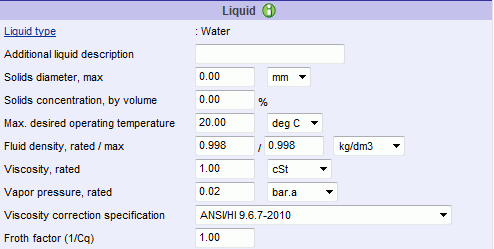
The Liquid section captures specific liquid information which may be defined for the search criteria. Liquids may be defined without properties or with properties. If the liquids have been defined "without properties", the Selector will use liquid properties defined by a Intelliquip driven liquid database. However, if the liquids have been defined "with properties", the Selector will use the liquid properties defined in the SKB. Click on the link below for Liquid Type to learn more information about specific liquid properties. The image below is an example of the Liquid section in the Advanced Operating Conditions twistie on the Operating Conditions tab of the Conditions of Service page
Click on the fields below more information.
This field allows the user to provide an enhanced description of the liquid, that will appear on all output pages such as the Performance Datasheet and the Performance Curve.
This field is used to check the maximum solids diameter of the product line and individual pump sizes. If the overall product line solids diameter limit is exceeded, it will not be displayed on the Product Lines page. If an individual pump size solids diameter limit is exceeded, it will be displayed as a Near miss, with the reason why, on the Search Results page and on the Performance Datasheet page.
Solids concentration, by volume
The user will be expected to enter the correct value between 0 and 100.
Max. desired operating temperature
The default value for this field is 20 C or 68 F. The value entered in this field will be checked with the limits described below.
If the overall temperature limit of a product line is exceeded, the product line will not be displayed on the Product Lines page.
If the maximum temperature limit for a pump size is exceeded, the selection will be displayed as a Near miss on the Search Results page and on the Performance Datasheet page.
The temperature is used to determine the flange pressure limits of a pump, and if the maximum working pressure exceeds this limit, the selection will be displayed as a Near miss on the Search Results page and on the Performance Datasheet page.
This field allows the user to specify the rated and max fluid density of the liquid. The rated value is used to convert between TDH and pressure. Max fluid density values will be used in calculating power performance data.
This field allows the user to specify the rated viscosity of the liquid. The value is used to correct water pump performance data to viscous pump performance data. The current selection algorithms use the Hydraulic Institute viscosity correction methods. Other supplier defined methods can be incorporated.
This field allows the user to specify the rated vapor pressure. The value is only used in the NPSHa calculator.
Viscosity correction specification
This field allows the user to apply the appropriate viscosity corrections and slurry corrections. Examples of viscosity corrections are ANSI/HI 1.1-1.5-1994, ANSI/HI 9.6.7-2004, ANSI/HI 9.6.7-2010, and Karassik BFW.
Karassik BFW is an efficiency adjustment for low viscosity hot water and slurry corrections. This feature is controlled by a setting specific to an organization. When enabled, a third viscosity correction specification will be made available on the Conditions of Service page and the Performance Datasheet page. When selecting this new viscosity specification, and alert is displayed as shown below.

ANSI/HI 12.1-12.6-2011 (Heterogeneous slurry) is a slurry corrections. The American National Standard for Rotodynamic (Centrifugal) Slurry Pumps (ANSI/HI 12.1-12.6-2011) defines recommended performance adjustments when handling slurries as well as recommended slurry settling velocities (deposit velocity).
When ANSI/HI 12.1-12.6-2011 (Heterogeneous
slurry) is selected a  link will display next to the dropdown.
Clicking the link will present the popup shown
below.
link will display next to the dropdown.
Clicking the link will present the popup shown
below.
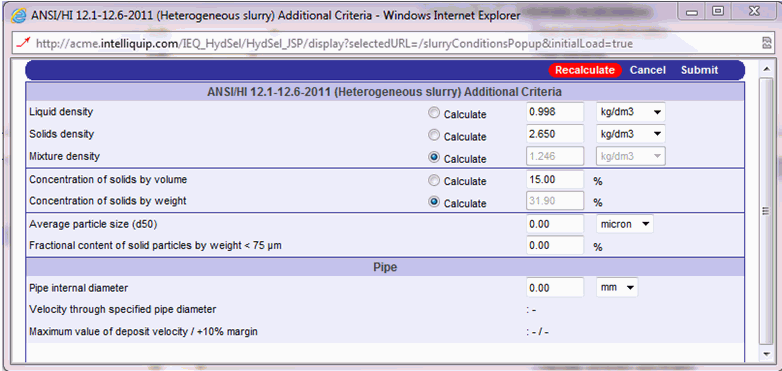
The default values will be as shown above. Both the Liquid density and the Mixture density will initially inherit their values from the Fluid density, rated value on the Conditions of Service page.
Of the three density values shown, the user will populate two of the values and the third will be calculated. The Calculate radio buttons allow the user to choose which value to be calculated.
Similarly, the user will populate between By volume or By weight for the Concentration of solids, and the other will be calculated.
The Mixture density value on the popup window and the Fluid density, rated value on the Conditions of Service page will be same.
Similarly, the Concentration of solids, By volume value on the popup window and the Solids concentration, by volume value on the Conditions of Service page.
This field allows the user to enter the value of particle size in the range supported by the HI standard. That range is 100 micron to 30,000 micron.
Fractional content of solid particles by weight < 75 µm
It allows the user to entre the value of solid particles by weight for the particles having size less than 75 µm.
This field is needed to calculate ”r;Velocity through specified pipe diameter” and ”r;Maximum value of deposit velocity / +10% margin”.
Velocity through specified pipe diameter
Value of this field will be populated based on the equation below:
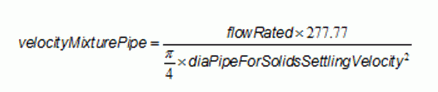
Maximum value of deposit velocity / +10% margin
Depending on the properties of the slurry a certain liquid velocity must be maintained in order to prevent the slurry from settling. Figure below is used to calculate the Maximum value of deposit velocity.
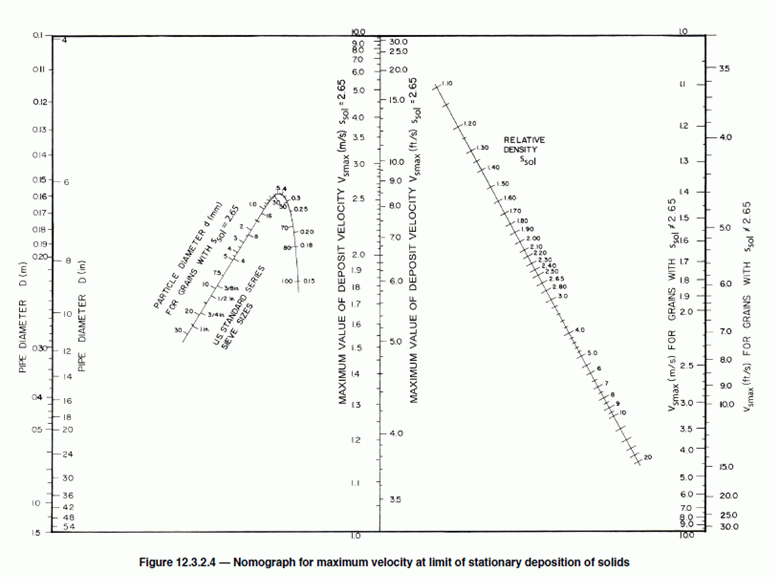
A near miss ”r;The actual velocity through the specified pipe diameter is less than the maximum value of deposit velocity defined by ANSI/HI 12.1-12.6-2011 section 12.3.2.4 + 10%” will be generated if the actual velocity through the specified pipe size is less than Vsmax * 1.1 (HI recommends a 10% margin), and the fields, Velocity through specified pipe diameter and Maximum value of deposit velocity / +10% margin will be highlighted in bold red.
This field allows the user to specify the froth factor.